Perhaps you blocked an old friend during an argument. Maybe you accidentally blocked the wrong person. Or perhaps you simply want to allow someone to contact you again without changing anything else about your Facebook account.
This raises an interesting question: Can you unblock someone on Facebook without losing your other account settings?
In normal circumstances, unblocking one person does not mean you have to reset your entire Facebook account. The important thing is to use the Blocking section rather than changing unrelated privacy settings.
What Happens When You Unblock Someone on Facebook?
When you unblock a person, the block placed on that account is removed. However, unblocking does not necessarily restore everything that existed before the original block.
For example, if you and that person were Facebook friends before the block, you should not assume that unblocking automatically restores the friendship. You may need to send a new friend request if you want to reconnect.
This is why unblocking and re-friending should be treated as two separate actions.
How to Unblock Someone Without Changing Other Settings
The safest approach is to change only the relevant blocking setting.
Step 1: Open Facebook
Log into your Facebook account using the official Facebook app or website.
Step 2: Open Settings
Go to Settings & privacy, then open Settings.
Facebook periodically changes the appearance and location of menu options, so the exact arrangement may look slightly different depending on the version of the app or website you are using.
Step 3: Find Blocking
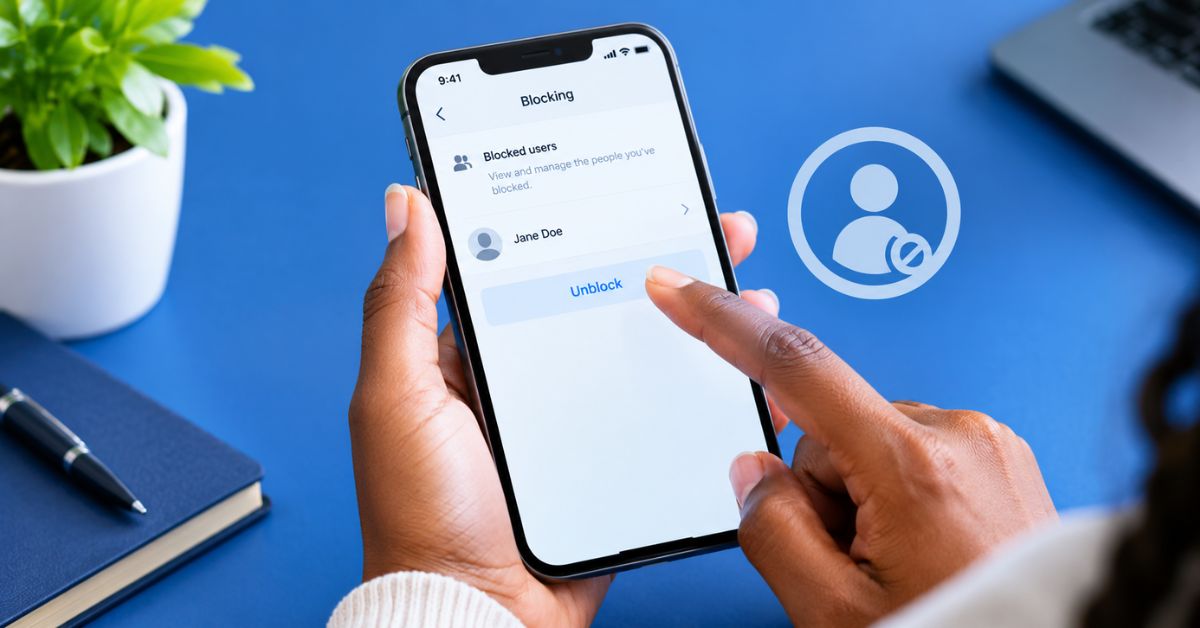
Look for the Blocking section. This is where Facebook allows you to manage people and other accounts that you have blocked.
Recent Facebook guides continue to place profile-blocking controls under the Settings area, although the precise menu path can vary by device and Facebook version.
Step 4: Find the Person
Open your blocked list and look for the person you want to unblock. Take your time here. If you have blocked several people, confirm the person’s name before selecting anything.
Step 5: Tap or Click Unblock
Select Unblock next to the person’s name, Facebook may ask you to confirm the action. Confirm only if you are certain you want to remove the block.
Will Unblocking Change Your Privacy Settings?
Unblocking a person is not the same thing as changing your overall privacy settings. You do not need to change your account’s privacy settings simply because you want to unblock one person.
However, the person’s ability to see or interact with you after the unblock will depend on your existing privacy settings and whether you reconnect with them. For example, if your posts are limited to friends, unblocking someone does not automatically make that person your friend again.
This is one reason why you should not change your privacy settings unnecessarily.
Will the Person Know You Unblocked Them?
Facebook’s blocking controls do not generally send a notification saying that you have unblocked someone. However, the person may eventually realise that the block has been removed if they search for your profile or attempt to interact with you again. For that reason, you should not assume that unblocking is completely invisible.
Does Unblocking Restore Your Old Messages?
Do not assume that unblocking automatically restores every part of a previous interaction. Facebook, Messenger and other platform features can have separate controls, and the experience can depend on what was blocked and where.
If your reason for unblocking someone is to resume communication, check Messenger separately if you still cannot send or receive messages.
Does Unblocking Automatically Make You Friends Again?
No, this is one of the most important things to remember.
If the person was removed from your friends list as a consequence of blocking, unblocking does not necessarily restore the old friendship.
You may need to send a new friend request. This means you can unblock someone without immediately giving them access to your friends-only content.
What If You Cannot Find the Person in Your Blocked List?
You may have blocked the wrong profile, the person may have changed their profile information, or you may have used a different Facebook blocking feature.
Facebook has different types of controls across its services, so make sure you are checking the correct Blocking section. If you cannot find the person, search your settings carefully rather than repeatedly changing other account options.
What If You Unblocked Someone by Accident?
If you accidentally unblock someone, do not panic. Simply return to the appropriate blocking controls and check what options are available.
One important limitation reported in current Facebook guidance is that Facebook may impose a waiting period before you can block the same person again. Recent guides describe this as 48 hours. Because Facebook can change its rules and interface, check the message shown by Facebook at the time rather than relying entirely on an old tutorial.
Should You Unblock Someone You Previously Blocked?
That depends on why the person was blocked in the first place.
If you blocked someone because of harassment, threats, fraud or unwanted contact, you do not have to unblock them simply because you have changed your mind about another situation.
Your online safety should come first. But if the block was accidental or resulted from a temporary disagreement, you may decide that reconnecting is appropriate. The important thing is to make the decision intentionally.
How to Protect Your Privacy After Unblocking
If you decide to unblock someone but do not want to immediately become connected again, review your existing privacy settings.
You can pay attention to:
- Who can send you friend requests
- Who can see your posts
- Who can find you using your contact information
- Who can comment on your posts
- Who can send you messages
- What information is visible on your profile
You do not need to change everything. The goal is to make sure your existing settings match the level of privacy you want.
Unblocking Is Not the Same as Trusting
There is a difference between allowing someone to find your profile again and deciding that you completely trust that person. If you had a serious reason for blocking someone, think carefully before reopening communication.
Facebook gives users blocking tools for a reason. You can unblock someone without immediately accepting a friend request, responding to messages or sharing personal information.
Final Thoughts
If you are searching for how to unblock someone on Facebook without losing your account settings, the main point is simple: you generally only need to modify the relevant blocking control. You do not have to reset your entire account.
Open the Facebook settings, locate the Blocking section, find the person and select Unblock. Current Facebook guides continue to describe this general process, although the exact menu names can vary between the mobile app and desktop version.
Remember that unblocking does not necessarily restore an old friendship, and you should not assume that every previous connection or conversation automatically returns.
Most importantly, if you originally blocked someone for safety reasons, you do not owe that person access to your profile simply because the unblock option exists.