Selling items on Facebook Marketplace can be fast and convenient, but sometimes you may not want your friends to see what you are listing. Whether you are decluttering your home, selling personal items, or simply prefer more privacy, Facebook gives users options to limit who can view their Marketplace listings.
If you have been asking, “How do I hide my Facebook Marketplace listing from my friends?” this guide explains everything in simple steps.
Can You Hide Facebook Marketplace Listings From Friends?
Yes, Facebook allows users to hide Marketplace listings from their Facebook friends. This feature is especially useful if you want to:
- Maintain privacy while selling items
- Avoid unnecessary questions from friends
- Prevent awkward conversations about your items
- Sell gifts secretly
- Separate your personal life from your online selling activities
Once enabled, your Marketplace listing can still appear to other Marketplace users, but your Facebook friends will not see it.
Things To Know Before Hiding Marketplace Listings
Before using this feature, there are a few important things to understand:
- The option works only for personal Facebook friends.
- Your listing may still be visible in buy-and-sell groups.
- Mutual friends could still hear about your listing from others.
- You must activate the setting before publishing or while editing the listing.
Understanding these points helps avoid confusion later.
How To Hide My Facebook Marketplace Listing From My Friends
Follow these simple steps below:
Step 1: Open Facebook Marketplace
Launch the Facebook app on your phone or open Facebook on your browser. Tap or click the Marketplace icon.
Step 2: Create a New Listing
Click on Create New Listing and choose the type of item you want to sell.
Examples include:
- Item for sale
- Vehicle for sale
- Home for sale or rent
Upload clear pictures and fill in the required details about the item.
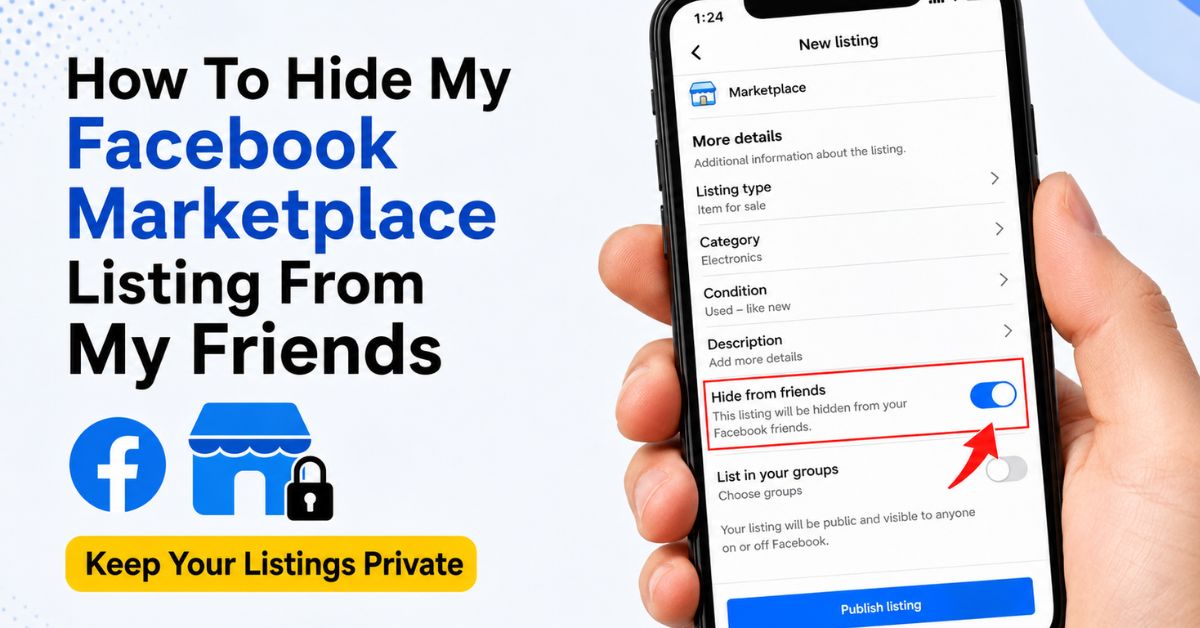
Step 3: Locate the “Hide From Friends” Option
As you scroll through the listing setup page, look for the option labeled: “Hide from friends”
Turn the toggle ON.
Once activated, Facebook will attempt to prevent your friends from seeing the listing in Marketplace feeds.
Step 4: Publish Your Listing
After reviewing your details, click Publish. Your item will now be live on Marketplace while remaining hidden from your Facebook friends.
How To Hide An Existing Marketplace Listing From Friends
If you already posted the item, you can still edit the privacy settings.
Follow These Steps:
- Open Facebook Marketplace
- Tap on Your Listings
- Select the item you want to edit
- Click Edit Listing
- Find the Hide from friends option
- Turn it ON
- Save the changes
Your updated privacy setting should take effect shortly afterward.
Why Some Friends May Still See Your Listing
Sometimes users notice that a few friends can still view their listings. This may happen because:
1. The Listing Was Shared In Groups
If you posted the item inside local buying and selling groups, group members including friends may still see it.
2. Friends Found It Through Search
In rare cases, Marketplace search results or shared links may expose the listing.
3. Privacy Settings Did Not Update Properly
Sometimes Facebook experiences temporary glitches. Editing and republishing the listing may help.
Tips To Keep Your Marketplace Activity More Private
If privacy matters to you, these extra tips can help.
Avoid Sharing Listings Publicly
Do not repost your Marketplace items directly to your Facebook timeline.
Use Neutral Listing Photos
Avoid pictures that reveal your home address, family members, or personal information.
Remove Location Details When Necessary
Only provide exact pickup details to serious buyers privately through Messenger.
Review Group Sharing Settings
Before posting in selling groups, check whether the group is public or private.
Benefits Of Hiding Marketplace Listings From Friends
Many Facebook users now use this feature because it provides:
- Better privacy control
- Less social pressure
- A cleaner selling experience
- Reduced unnecessary comments
- More confidence while selling personal belongings
It can make Marketplace feel more professional and comfortable.
Conclusion
Facebook Marketplace is an excellent platform for buying and selling items locally, but not everyone wants their friends involved in their selling activity. Thankfully, Facebook’s “Hide from friends” feature makes it easier to keep your listings more private.
By turning on this simple setting, you can sell comfortably, reduce unwanted attention, and enjoy a smoother Marketplace experience. Always remember to review your listing settings carefully before publishing to make sure your privacy preferences are enabled properly.
Frequently Asked Questions
Does Facebook Notify Friends About Marketplace Listings?
No, Facebook does not send direct notifications to friends when you create a Marketplace listing.
Can I Hide Marketplace Listings From Specific People?
Currently, Facebook mainly offers the “Hide from friends” option rather than selecting individual people.
Will Buyers Still Be Able To Message Me?
Yes, other Marketplace users can still contact you normally through Messenger.
Does This Feature Work On Every Listing?
The option is available for most standard Marketplace listings, though some categories or group posts may behave differently.